> For the complete documentation index, see [llms.txt](https://magecomp.gitbook.io/shopify/llms.txt). Markdown versions of documentation pages are available by appending `.md` to page URLs; this page is available as [Markdown](https://magecomp.gitbook.io/shopify/apps/rewardo-loyaly-program/dash-board.md).
# Dash board
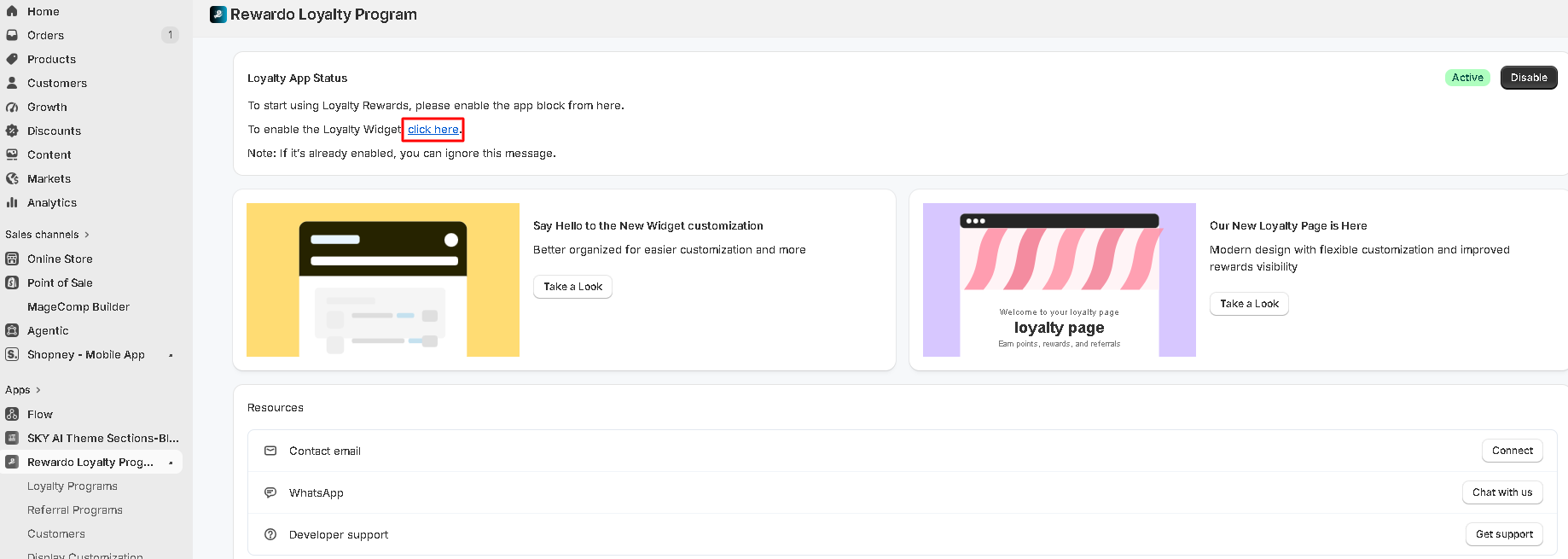
The **Dashboard** provides an overview of your loyalty program's status and guides you through the initial setup. From here, you can quickly enable the required components and access the latest customization updates.
### Loyalty App Status
The **Loyalty App Status** section displays whether your loyalty program is active.
If the required components are not enabled, the dashboard will prompt you to complete the setup by enabling the app block and loyalty widget.
{% hint style="info" %}
**Note:** If the App Block or Loyalty Widget is already enabled, you can ignore the setup prompts.
{% endhint %}
### Enable the Loyalty App Block
The Loyalty App Block integrates Rewardo with your Shopify theme.
To enable it:
1. Click **Enable App Block**.
2. You will be redirected to the Shopify Theme Editor.
### Enable the Loyalty Widget
The Loyalty Widget allows customers to access their rewards and loyalty information directly from your storefront.
To enable it:
1. Click **Enable Loyalty Widget**.
2. Follow the on-screen instructions in the Shopify Theme Editor.
3. Save the changes.
Once enabled, customers will be able to interact with your loyalty program from your online store.
### New Widget Customization
The dashboard introduces the new **Widget Customization** experience, making it easier to personalize the appearance of your loyalty widget.
**Benefits:**
* Better organized customization settings.
* Easier navigation and configuration.
* Improved flexibility for branding your loyalty widget.
### New Loyalty Page
Rewardo includes a redesigned **Loyalty Page** that provides customers with a modern experience for viewing and redeeming rewards.
**Key Highlights:**
* Modern and responsive design.
* Flexible customization options.
* Improved visibility of available rewards and loyalty activities.
* Enhanced customer experience.