# COD Form Builder
The COD Form Builder lets you create a custom Cash on Delivery (COD) form and display it on the When a customer clicks **“Buy with Cash on Delivery”**, a pop-up form opens where they enter their details (such as name, phone number, and address).
After submission:
* The order is automatically created
* The payment method is set to **Cash on Delivery (COD)**
* You receive the order for processing
This helps you collect accurate customer information and reduce fake COD orders before the order is created.
### How It Works
1. Customer clicks **Request COD**
2. Your customized form opens
3. Customer fills in the required details
4. Form validates the information
5. COD request is submitted for your review
### How to Add a Field
1. Click **Add Field**
2. Select the required Field Type
3. Configure field settings
4. Save changes
5. Drag and drop fields to reorder them
Each field includes the following options:
#### Field Label
The title is displayed above the field.\
Example: *Full Name*, *Phone Number*
#### Placeholder Text
Helper text is shown inside the field before typing.\
Example: *Enter the complete address with the landmark*
#### Required Field
If enabled, customers must fill this field before submitting the form.
#### Validation Settings
Used to control the format and length of input, such as:
* Minimum Length
* Maximum Length
* Custom Error Message
* Format validation (Email / Phone)
Validation ensures accurate and usable customer data.
### 1. Address (Text Area – Mandatory & Cannot Be Removed)
The **Address** field is used to collect the customer’s complete delivery address for the COD order.
This is the **only mandatory system-required field that cannot be removed from the form**.\
Since COD orders require a valid delivery location, this field must always remain in the form.
#### When to Use It
This field is essential for every COD request. It helps you:
* Ensure accurate delivery
* Avoid incomplete address submissions
* Reduce return-to-origin (RTO) orders
* Improve successful delivery rates
Customers should provide their full address, including landmark details if applicable.
#### Field Settings:
**Field Type:** Text Area\
Allows customers to enter detailed, multi-line information.
**Placeholder Text:**\
Example: *Complete address with landmark*\
This guides customers to provide full delivery details instead of a short or incomplete address.
**Required Field:** Enabled\
Customers cannot submit the COD request without entering their address.
#### Validation Settings:
**Minimum Length:** 10\
Ensures customers do not enter very short or incomplete addresses.
**Maximum Length:** 500\
Prevents excessively long entries while allowing enough space for complete address details.
### 2. Full Name
The **Full Name** field is used to collect the customer’s complete name when they submit a COD request.
#### When to Use It
This field should always be included in your COD form.
It helps you:
* Identify the person placing the order
* Avoid anonymous or incomplete submissions
* Maintain proper order records
#### Field Settings
**Field Type:** Text Field\
Allows customers to enter short, single-line text.
**Placeholder Text:**\
Example: *Full name*\
This helps guide customers on what to enter.
**Required Field:** Enabled\
Customers cannot submit the COD request without entering their name.
#### Validation Settings
You can control how customers enter their names:
* **Minimum Length:** 2 characters\
Prevents very short or invalid entries.
* **Maximum Length:** 100 characters\
Prevents excessively long input.
* **Validation Pattern (Regex):**\
Optional advanced setting if you want to restrict input (for example, letters only).
You can leave the validation pattern empty if no special restriction is needed.
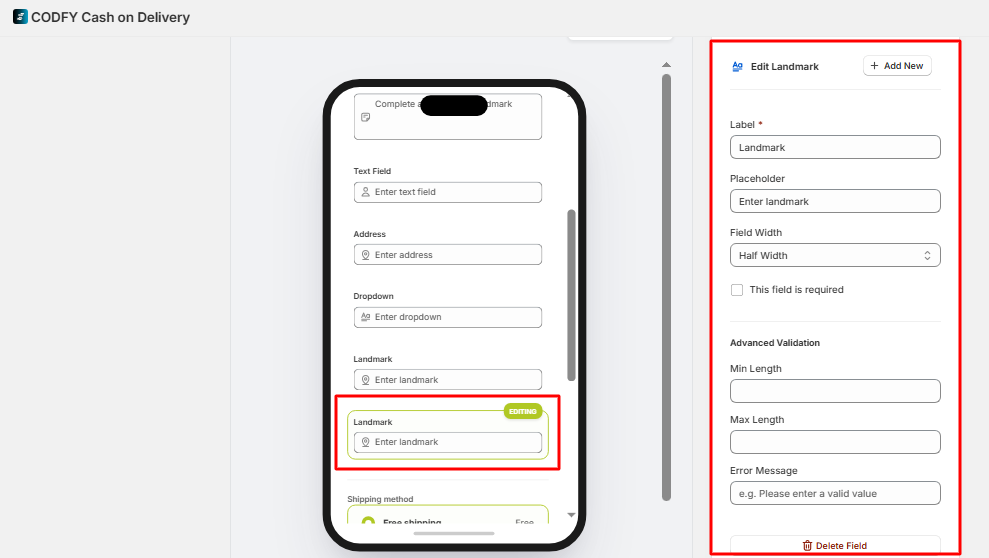
#### 3. Landmark Field
The **Landmark field** helps customers provide nearby location details (e.g., building, shop, or reference point) for easier delivery.
#### Settings
* **Label:**\
Field name shown to customers (default: *Landmark*)
* **Placeholder:**\
Hint text inside the field (e.g., *Enter landmark*)
* **Field Width:**
* *Half Width* → Takes half row (can align with another field)
* **Required:**\
Enable making this field mandatory
#### Advanced Validation
* **Min Length:** Minimum characters required (e.g., 3)
* **Max Length:** Maximum characters allowed (e.g., 50)
* **Error Message:** Message shown if input is invalid\
\&#xNAN;*(e.g., “Please enter a valid landmark”)*
{% hint style="info" %}
Keep this field optional, but use validation to ensure meaningful input.
{% endhint %}
### 4. Email Field
Collects customer email addresses.
This field automatically checks for a valid email format.
Best for:
* Sending confirmations
* Follow-up communication
* Additional verification
You can set a custom error message if the email format is incorrect.
Use this if you want an additional contact method besides phone.
### 5. Phone Field
The **Phone Number field** collects the customer’s contact number, which is essential for order confirmation and delivery communication.
#### Settings
* **Label:**\
Field name shown to customers (default: *Phone no*)
* **Placeholder:**\
Hint text inside the field (e.g., *Enter phone no*)
* **Field Width:**
* *Half Width* → Takes half row and can align with another field
* **Required:**\
Enable making this field mandatory (recommended)
#### Advanced Validation
* **Min Length:** Set minimum digits (e.g., 10)
* **Max Length:** Set maximum digits (e.g., 15)
* **Error Message:** Message shown if input is invalid\
\&#xNAN;*(e.g., “Please enter a valid phone number (10–15 digits)”)*
{% hint style="info" %}
Always keep this field **required** and apply validation to ensure correct contact details for delivery.
{% endhint %}
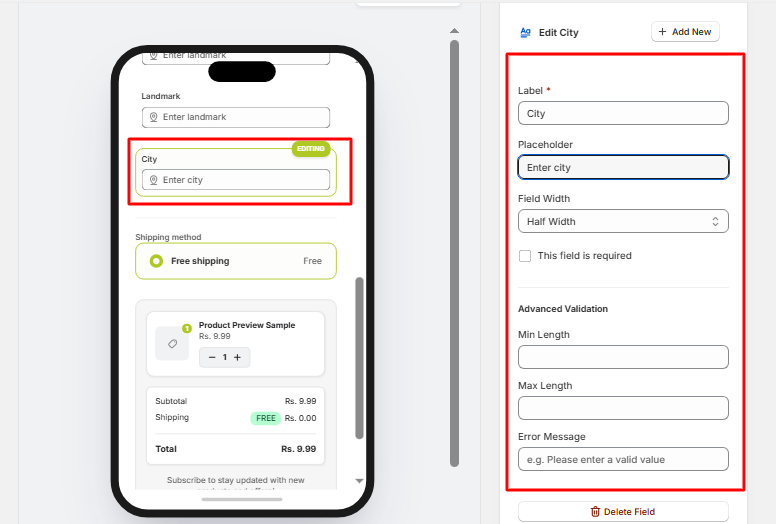
### 6. City Field
The **City field** captures the customer’s city to ensure accurate delivery and order processing.
Allows multi-line input for detailed information.
#### Settings
* **Label:**\
Field name shown to customers (default: *City*)
* **Placeholder:**\
Hint text inside the field (e.g., *Enter city*)
* **Field Width:**
* *Half Width* → Takes half row and can align with another field
* *Full Width* → Takes the full row and can align with another field
* **Required:**\
Enable making this field mandatory for order submission
#### Advanced Validation
* **Min Length:** Minimum characters required (e.g., 2–3)
* **Max Length:** Maximum characters allowed (e.g., 50)
* **Error Message:** Message shown if input is invalid\
\&#xNAN;*(e.g., “Please enter a valid city”)*
{% hint style="info" %}
Keep this field **required** and use validation to avoid incomplete or incorrect city names.
{% endhint %}
### 7. Dropdown
Allows customers to select one option from a predefined list.
You must enter each option on a new line in the settings.
Best for:
* Selecting a city or region
* Delivery time slots
* COD confirmation type
* Predefined order preferences
Use dropdowns when you want standardized answers instead of free text.
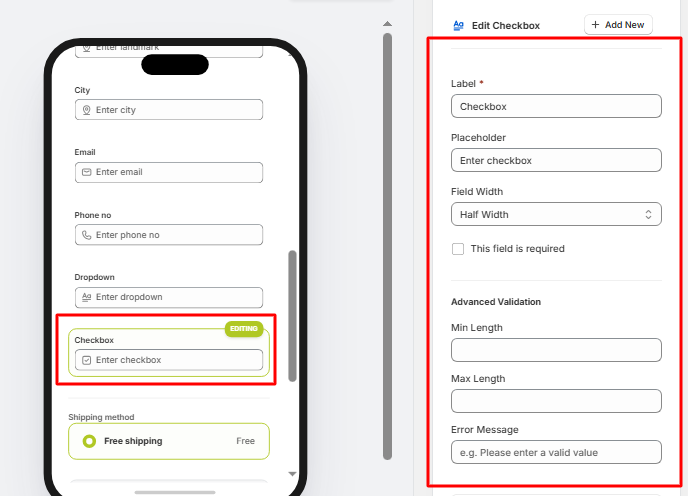
### 8. Checkbox
Allows customers to confirm or agree before submitting.
Best for:
* Confirming the correct address
* Accepting COD terms
* Acknowledging COD charges
If marked as required, customers must tick it before submission.
Use this to reduce disputes and ensure customer acknowledgment.
### 9. State Field
The **State field** captures the customer’s state/region to ensure accurate delivery and shipping calculations.
#### Settings
* **Label:**\
Field name shown to customers (default: *State*)
* **Placeholder:**\
Hint text inside the field (e.g., *Enter state*)
* **Field Width:**
* *Half Width* → Takes half row and can align with another field
* *Full Width* → Takes the full row and can align with another field
* **Required:**\
Enable making this field mandatory (recommended)
#### Advanced Validation
* **Min Length:** Minimum characters required (e.g., 2–3)
* **Max Length:** Maximum characters allowed (e.g., 50)
* **Error Message:** Message shown if input is invalid\
\&#xNAN;*(e.g., “Please enter a valid state”)*
{% hint style="info" %}
Keep this field **required** and use validation to ensure accurate regional information for delivery.
{% endhint %}
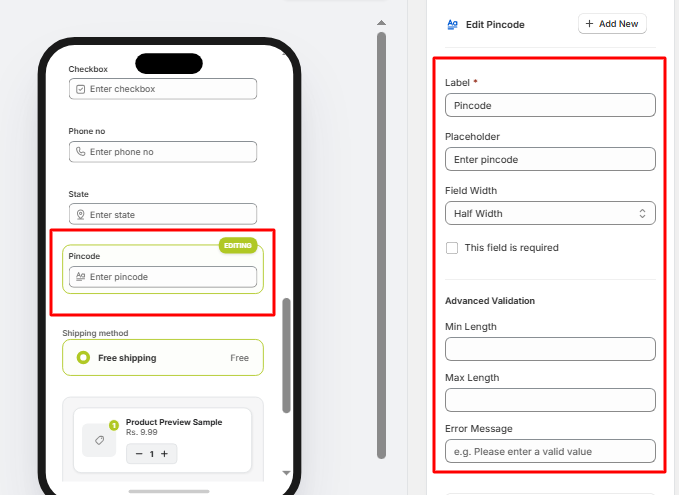
### 10. Pincode Field
The **Pincode field** captures the customer’s postal code to determine delivery availability and apply COD rules.
#### Settings
* **Label:**\
Field name shown to customers (default: *Pincode*)
* **Placeholder:**\
Hint text inside the field (e.g., *Enter pincode*)
* **Field Width:**
* *Half Width* → Takes half row and can align with another field
* *Full Width* → Takes the full row and can align with another field
* **Required:**\
Enable making this field mandatory (recommended)
#### Advanced Validation
* **Min Length:** Minimum digits required (e.g., 5–6)
* **Max Length:** Maximum digits allowed (e.g., 6–10)
* **Error Message:** Message shown if input is invalid\
\&#xNAN;*(e.g., “Please enter a valid pincode”)*
{% hint style="info" %}
Always keep this field **required** and apply validation to ensure correct delivery area and COD eligibility.
{% endhint %}
### 11. Order Note Field
The **Order Note field** allows customers to add special instructions for their order (e.g., delivery preferences, timing, or additional details).
#### Settings
* **Label:**\
Field name shown to customers (default: *Order note*)
* **Placeholder:**\
Hint text inside the field (e.g., *Enter order note*)
* **Field Width:**
* *Half Width* → Takes half row and can align with another field
* *Full Width* → Takes the entire row for better visibility
* **Required:**\
Enable if you want customers to обязательно provide instructions (usually optional)
#### Advanced Validation
* **Min Length:** Minimum characters required (optional)
* **Max Length:** Maximum characters allowed (e.g., 255)
* **Error Message:** Message shown if input is invalid\
\&#xNAN;*(e.g., “Please enter a valid note”)*
{% hint style="info" %}
Keep this field **optional** and allow enough character limit so customers can clearly describe their instructions.
{% endhint %}
### 12. Date Picker Field
The **Date Picker field** allows customers to select a preferred date (e.g., delivery date or pickup date).
#### Settings
* **Label:**\
Field name shown to customers (default: *Date picker*)
* **Placeholder:**\
Hint text inside the field (e.g., *Select date*)
* **Field Width:**
* *Half Width* → Takes half row and can align with another field
* *Full Width* → Takes the entire row for better visibility
* **Required:** Enable date selection to be mandatory
#### Advanced Validation
* **Min Length / Max Length:**\
Not typically required for date fields
* **Error Message:**\
Message shown if no date is selected (when required)\
\&#xNAN;*(e.g., “Please select a valid date”)*
{% hint style="info" %}
Use this field when you want customers to choose a **preferred delivery or pickup date**.
{% endhint %}